

This blog post is for WordPress Premium users. When I first purchased the Explorer package (formerly the Premium package), I faced some challenges. especially as a non-coder. To navigate and troubleshoot, We often have to rely on resources like YouTube (or what I call the “open university”). As you can see, all those videos were for advanced packages! Any video would start with plugins.
It was really difficult in the beginning. But some learnings has helped me a lot.
The purpose of this post is to share insights that I learnt using this one, particularly for those with budget constraints or limited coding experience like me.
My WordPress Journey
First, let me provide some context. Remember my previous blog post about starting with WordPress? Back then, I didn’t fully grasp the significance of plugins and themes. I just wanted a space to write freely. Initially, my focus was solely on having a platform of my own without too much concern for SEO or audience reach. I even downplayed the need for plugins.
But as I continued to write, I began exploring SEO. I told myself that I write about things that interest me rather than forcing myself to write about trending things. Slowly, I changed the two titles to SEO based titles.
Key Learnings with Explorer
#Theme Customization
You can customize your theme without knowing how to design it. You can simply navigate to Appearance > Editor in the settings. There, you can adjust colors, backgrounds, fonts, margins, rearrange the blocks, and more to your liking. Trail and error helps!
#Plugins
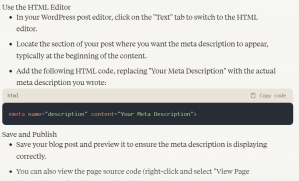
Some of the things can’t be done without plugins like Woo Commerce Store or Backup, yet a few things can be done. For that only, I rely on AI tools like GPT-3 (too poor for GPT – 4), Claude, or Gemini. It gives an alternative to adding additional CSS or HTML. (Please do your research based on your needs.) For example, when I asked where to add a meta description when I don’t have that plugin, the Claude said the following. We just have to careful with the prompts.
If you’re interested in customizing beyond the easy ones, there’s an option to add additional CSS for specific modifications, though I recommend caution unless you’re confident in what you’re doing.
#Free Analytics Tools:
Since the Explorer plan doesn’t include plugin options for analytics, though Jetpack is there. I would still recommend using the Google Search Console and Google Analytics. While many suggest using paid tools like SEMrush or Moz,
I’ve found the free Google tools to be sufficient for now. Ahrefs are also useful because they give a full site audit report on pages that are not being indexed, have redirect errors, or have broken links.
#Stripe Integration Struggles
Connecting to a Stripe account, especially from India (not sure about others), has been a bit hard. It has an initial waiting period. For connecting to WooCommerce to receive payments, plugins are needed. I’ve personally faced some challenges with this, so if anyone has any insights or suggestions, I’d love to hear them.
Overall, the WordPress Explorer package can be a great option for those on a budget, but it does require some workarounds and learning. While AI can’t write your entire blog post the way you want it to, it can certainly assist you (non-technical users like myself) with specific tasks. Sure, it is a valuable resource for us too.
If you found this helpful, please give it a thumbs up and share it with anyone who might benefit. Feel free to leave a comment below as well!! Do subscribe to it for free so that it comes directly to your inbox!
Cheers!
PS: If you’d like to support my work, you can donate via my UPI ID (Stripe issues, LOL)
Have a great weekend ahead!
Don’t miss out! Get notified about new blog posts straight to your inbox ! (No spam, pinky promise!)
Enter your email below to receive updates.

 Random Whys